Showing posts with label OS. Show all posts

Friday, April 29, 2011

Ubuntu 11.04 review


Every one was waiting for Ubuntu 11.04, because of the new Unity interface which is totally different from the Gnome, well Ubuntu 11.04 was just released yesterday and I installed it on my machine so I thought I could write what I think of it:

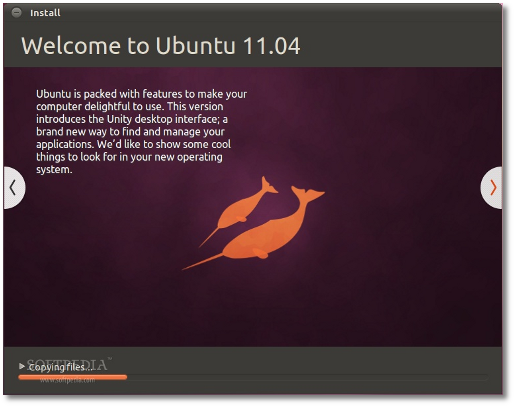
Installation is getting better this version:
  1. The interface is better
  2. Auto detect of existing Ubuntu installation, so you can just upgrade.
  3. Auto detect of existing Ubuntu installation, so you can overwrite it instead of manually choosing the partitions.
  4. Ability to download upgrades and MP3 plugins during installation to save time

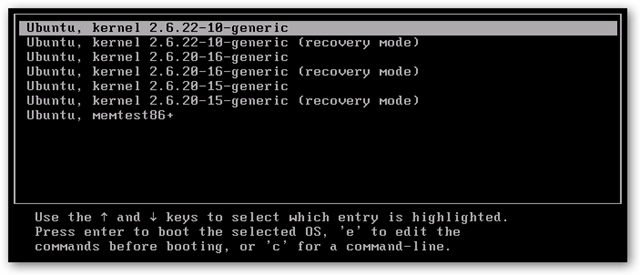
A better looking grub loader ( it is not in 10.04 I don't know if it was there in 10.10 or not)

Unity :)

Generally it is just great, I think people were scared that it would not be simple as much as GNOME is or it will have performance issues, but I can tell you it is simple and light.
Still I am not really satisfied with the default applications like Banshee instead of Rythmbox, but it seems like the new Libre Office is better than Open Office, anyway you can install and uninstall whatever you want, you can even remove Unity and install GNOME if you don't like it.

Best thing is that you can access things easily and faster because Unity offers suggestions for you when you open the menu.

Few things I don't like about Unity is that it is not as customizable as GNOME where you could add and edit panels, but I think more developers will provide applets that can be used with Unity.

Ubuntu software center:

You now can review apps and write comments about the applications.


Wednesday, January 27, 2010

Clean Your Grub !!


If you are an Linux user, you must be familiar with the kernel updates (especially when you download a cut edge version), those updates are important and surely we do them, but the problem shows up when you find your grub full of kernels ( a kernel version + recovery), this happened to me I had 4 kernels with 4 recovery and another memory check, add to that I have Windows 7, so actually I had 10 items in my grub menu which makes it looks like a start menu :D, so I searched for a way to solve that problem, and I found this link ... it's very good, I tried it my self and removed two kernels and left two for safety, just follow the instructions but be careful coz you are missing with your kernel here!!

Tuesday, September 1, 2009

First Day

At last Software Freedom Day (SFD) has started !! to day we the organizing team went to college early to prepare thing, we had to get tables, stands and chairs, we also prepared registration lists and hanged the posters. The great thing that people came early and they were excited, actually the number was larger than we expected, we had about 500 registration and about 300 people showed up today, some of them were registered but some made on-site registration.

The day started with an opening that was delivered by Eng.Hamdy Khalil from eSpace, he explained what is Free and Open Source Software (FOSS) and everyone liked it, then they had a 30 minute break to get the program, register their attends and claim their prizes: bags, CDs and pens.

At 12:30, Eng.Mekkawy also known as linuxawy from EGLUG started his session about the Free Software explaining the Main Four Freedoms, he also gave them his email and asked their questions.

Well after that people made some inquiries at the stands and registered for the study groups which actually have so many registered attendees (almost everyone!!).

If you haven't been there today, you missed alot but don't worry you still can come and join us even if you haven't yet registered.

Tuesday, July 7, 2009

Clean you Vista


Hi everyone,

If you are using Windows Vista like me, you may have noticed that the free space on your C drive where you installed Windows decreases even if you install no new software on it. This is caused by many things, the most important ones are temporary internet files which are files stored on your hard to enable you surf the internet faster, Temp folder which may be up to five GB which saves configurations about applications you ran on your computer, the hibernate files which enables your computer to hibernate.

You can clean them up and free space so you can speed up your system by using the clean up disk tool
Start -> Accessories -> System tools -> Disk Clean Up

Any way if you really want to clean every thing and get more space, I recommend a tool called CCleaner (Crap Cleaner), it just Free 3.8 MBytes and still it cleans your folders safely and fast, it cleaned about 9 GB from my C Drive !!!

Go to CCleaner